Applications
Our data-driven workflows allows to optimize the jetting performances over any printing parameter, for any kind of application, within seconds.
Our software automatically applies the waveforms and other printing parameters, stores the corresponding dropwatching imags and the properties of all visible drops, and provides a powerful visualization tool to analyze the performances. The storage of all the parameters and outcomes in a database guarantees the complete retrieval of the data at any time, enabling a fully reproducible and transparent workflow.
Below are examples of our most common features and optimizations.
Drop Formation
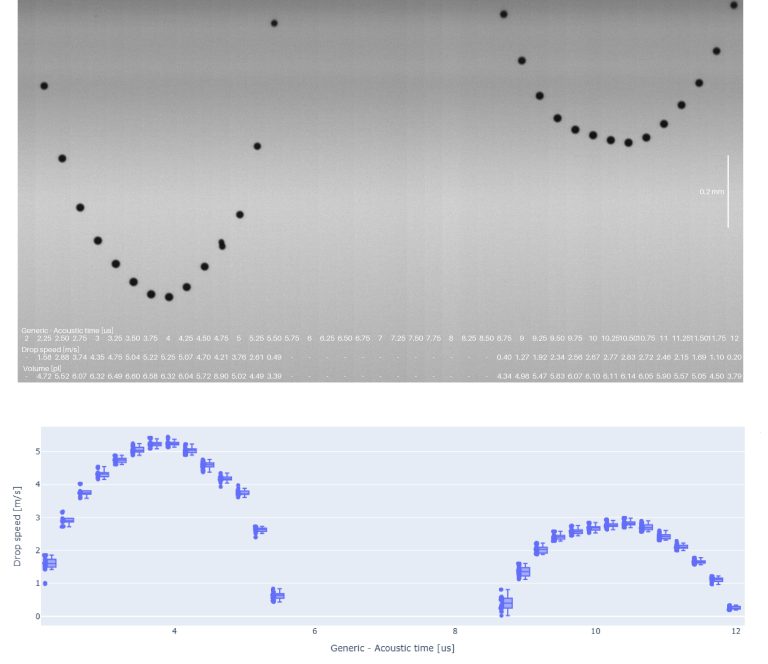
Drop Formations images are computed by creating a stitching as a function of the LED flash delay: the first column represents the first delay, and its value is incremented in every column until the last delay. It is a very visual way to understand the dynamics happening during the first microseconds of a drop ejection.
In the example below, a 4DPD waveform is used to eject one large drop from an Epson printhead.
A short video showing the workflow to get such images is available below:
Waveform Editor
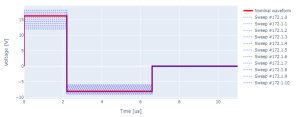
Both analog and digital waveforms can be controlled and optimized. All waveform parameters (amplitudes, durations and slew rates) can be swept automatically to measure their effect on the drop properties.
1D Waveform Sweeps
Since the waveform control is integrated in the Droptimize software, the sweep of any waveform parameter is possible. Below is a video that shows the workflow to sweep the pulse duration, with additional examples further down the page.
Acoustic Time Sweep
The acoustic time sweep is the first step in waveform developement. It is computed by testing waveforms with different pulse durations and identifying which one yields the maximum speed.
Amplitude Sweep

Pulse Spacing Sweep
Investigating the pulse spacing allows to identify the delay between the pulses that yields the target drop properties, such as speed, volume, and absence of satellite. This is used for multi-pulse waveforms, where multiple drops will be combined to achieve larger dots. In the example below, the speed is maximal at 9-10us pulse duration, but fully merged drops are present only at high or lower durations.
2D Sweep: Amplitude and Temperature
Multi-dimensional sweeps allow to understand the effect of sets of printing parameters. This is typically used to speed up the optimizations within relatively small windows of parameters.
In the example below, it is used to get the voltage scaling for different temperatures by changing both these values and analyzing the resulting drop speed. In case of changes of temperature, it is recommended to scale the voltage accordingly to maintain the same drop speed and overall jetting performance. All the information to compute this scaling can be extracted from the plot below.
High-Frequency Optimization
Stability over the whole frequency range is critical for applications where the printing speed varies. The stability is measured by comparing the drop speed at different frequencies. The waveforms are then optimized to minimize the instabilities in the critical regions.
In the example below, the target frequency was 48kHz with a Samba G3L 2DPD waveform, which was highly unstable without damping. It was optimized by sweeping the parameters for the damping pulse at the target frequency until stability was achieved with the right speed and volume.
Long-Distance Optimization
Long-distance jetting is used to print on uneven surfaces or for robotic printing on 3D objects.
For these applications, the jetting performances over larger distances are critical. This is typically achieved by increasing the kinetic energy in the drops with both the speed and volume so that they retain a straight trajectory until they reach the surface.
In the example below, a Seiko RC1536 was used to print at 22m. The waveform was optimized to maximize the stability over such a long distance by increasing the drop speed and volume.


Misting Reduction
Misting leads to ink accumulation on the nozzle plate and other printer parts when printing at high loads for long durations. This ultimately leads to nozzle failures, requiring the production to stop for the duration of maintenance. We’ve developed dedicated tools to limit these effects by quantifying the misting and minimizing it. This is achieved by classifying all visible drops in the image into 3 categories:
- Drops: Main drops that have a volume similar to or higher than the nominal drop size.
- Satellites: Smaller drops that are still likely to reach the substrate.
- Mist: Very small droplets, typically below 300fl, that act like aerosols and will land on nearby surfaces
Thanks to our advanced optics, we’re able to measure drops with volumes down to 10fl. We count their total number in the images and use this criterion to minimize misting. In the example below, the duration of the runs before maintenance was increased from two to four hours by reducing the number of mist by 50%.
Nozzle Navigator
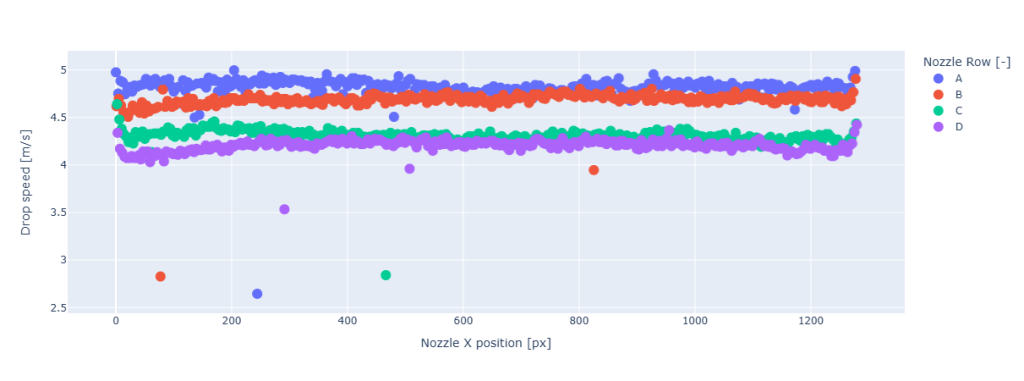
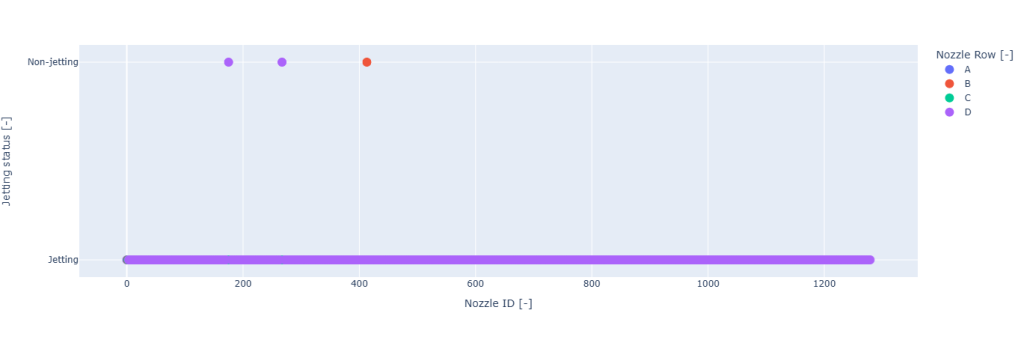
The nozzle navigator maps the drops seen in the dropwatching images with their position in the printhead. It allows to automatically move to any nozzle, activate it, and measure its jetting performances.
In preview mode, 4 options are available:
- Activate all nozzles
- Activate the nozzles in the selected row
- Activate the nozzles in the Field Of View
- Activate single nozzles
When doing automated tests, the nozzle navigator allows automatic measurement of groups or rows of nozzles. This is especially useful to control the printhead condition or gain more insight into the stability of the jetting. In the example below, an entire row (320 nozzles) is scanned, and the jetting performances of each nozzle are measured.
Open Nozzle Time
The behavior of the drops after non-jetting periods is critical for the stability of the printing process. This is one of the most common issues encountered when printing with solvent or water-based inks. Our unique workflow allows to evaluate the first drops jetted after idling and compare their recovery in a reproducible manner. This insight is key in optimizing ink formulation, tickling, and ink recirculation.
In the attached plot, the printhead was jetting at 1kHz after idling for up to 900s. One image was acquired every 50ms once the jetting was restarted. At short idling periods, little to no instability in the drop position can be observed. However, idling periods of 60s and higher yield an increasing change in the drop positions, or even missing drops, meaning that the drops are absent or slower before recovering. No recovery was observed at 900s, meaning that the maximal open nozzle time was 300s.